
Chapter 7
System Architecture
SANKET Technical Security & Architecture Whitepaper. Public edition 2.0, 7 October 2026.
A SANKET installation is a self-contained set of services that a customer runs on its own infrastructure. Each customer has its own installation: there is no shared multi-tenant service and no vendor-operated component in the communication path.
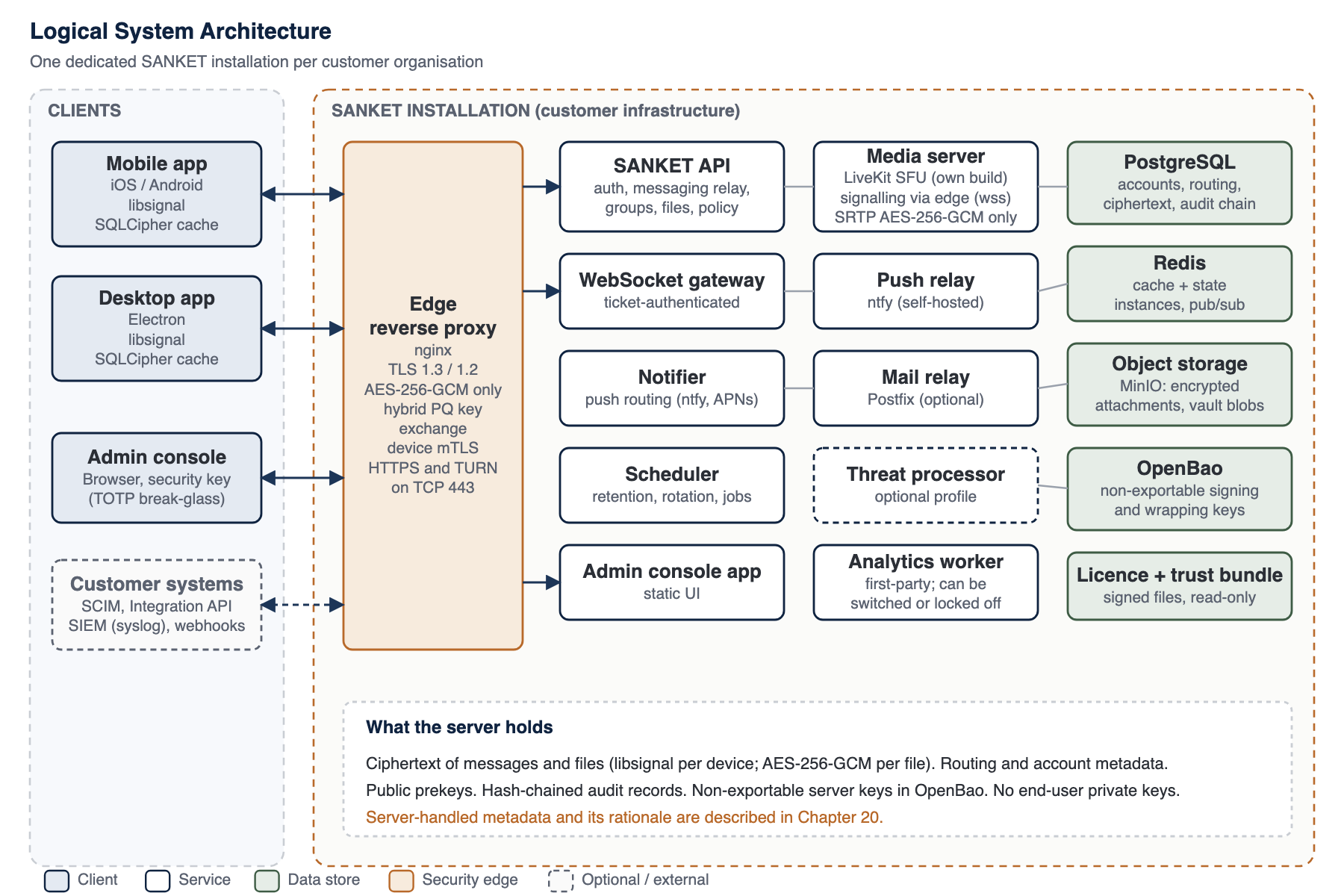
Figure 2: Logical system architecture
7.1 Client Applications and Supported Platforms
SANKET users work with native applications on phones and computers. There is no browser-based client for end users: browser messaging is deliberately excluded, because it would require running the Signal Protocol inside a web page served by the installation, which would let whoever controls the server change the cryptographic code delivered to users. The only browser application is the administrator console, used by administrators and never for communications.
Table 11: SANKET applications and supported platforms
| Application | Platforms and minimum versions | Distribution | Role |
|---|---|---|---|
| SANKET for Android | Supported Android releases; built against the current Android SDK | Signed APK or app bundle for the customer's managed distribution or a private store listing | Primary device |
| SANKET for iOS and iPadOS | Supported iOS and iPadOS releases, including the current release | Apple App Store, Apple Business Manager custom app, or enterprise distribution | Primary device |
| SANKET for Windows | Supported 64-bit Windows releases | Signed installer (Authenticode); automatic updates from the customer's own installation, verified against the publisher | Companion device linked from a phone |
| SANKET for macOS | Supported macOS releases, on Apple silicon and Intel processors (separate native builds) | Signed and notarised disk image; automatic updates from the customer's own installation | Companion device linked from a phone |
| SANKET for Linux | Mainstream 64-bit distributions | AppImage, .deb and .rpm packages | Companion device linked from a phone |
| Administrator console | Current desktop browsers | Served by the customer's installation | Administration only; no messaging |
Minimum platform versions follow the supported range of the underlying platform SDKs, are reviewed with each release and are stated in the controlled edition.
Mobile (iOS and Android). The primary client, built with React Native on Expo. Signal Protocol operations run in a thin native module that calls the official libsignal Swift and Java libraries (the current audited libsignal release); no protocol logic is reimplemented in JavaScript. Protocol state and device secrets are encrypted with AES-256-GCM under a hardware key: on iOS a key derived from a Secure Enclave P-256 key, on Android a StrongBox key where the phone has one and a key in the trusted execution environment otherwise (Chapter 11). The local message and attachment cache is a SQLCipher database plus AES-256-GCM encrypted files. Each approved device also holds a client certificate for device mutual TLS, whose key is generated on the device and protected the same way (Chapter 26). Android devices receive wake-ups through the installation's own push relay; iOS devices use Apple's push service in connected deployments (Chapter 23).
Desktop (Windows, macOS and Linux). Built on a supported Electron release line, the desktop application is a companion client linked from a trusted phone. All cryptographic operations and key storage run in the application's main process using the official libsignal TypeScript binding. Its client certificate for device mutual TLS is presented from the main process; the user interface never sees the key. The desktop is also the only client that can send end-to-end encrypted broadcasts, from a dedicated broadcast-sender account, encrypting each broadcast for every recipient device in its main process (Chapter 17). The user interface is restricted by a runtime network allowlist that cancels any request to a host outside the tenant's own hosts, and desktop builds are checked for foreign hosts at build time.
Administrator console. A browser application served by the installation. Administrator sign-in always requires a second factor, a FIDO2 security key (WebAuthn) verified by the installation itself; the first factor can be a local password or, optionally, the customer's own OIDC or SAML identity provider (Chapter 13). Access tokens are held in memory; the refresh token is an HttpOnly, SameSite=Strict cookie scoped to the authentication path.
Mobile and desktop parity. Message sending and receiving, delivery and read state, attachments, calls and call signalling, session handling, retries and security prompts follow the same protocol semantics and API contracts on every platform. Platform differences are limited to user interface and native storage mechanisms.
7.2 Server Components
Table 12: Server components of an installation
| Component | Implementation | Role |
|---|---|---|
| Edge | nginx with an OpenSSL release that supports ML-KEM, pinned by digest | The only public TCP listener (443). Routes each connection by its TLS server name without decrypting it: TURN to a TLS terminator in front of the media server, everything else to the HTTPS virtual hosts, with the client address carried over PROXY protocol for rate limits, the administrator network allowlist and audit. TLS termination (TLS 1.3 and 1.2, AES-256-GCM suites only; hybrid X25519MLKEM768 key exchange offered first), device client-certificate verification against the customer CA and its revocation list, HSTS and security headers, request rate limits, routing to internal services. |
| API | SANKET API (Node.js on a supported LTS line, Fastify), non-root container | Authentication (passwords, TOTP, WebAuthn security keys, federated sign-in against the customer's own identity provider), sessions, device management and the append-only log of signed device lists, key directory, message relay and storage, groups, files, calls signalling, broadcast metadata and per-device broadcast ciphertext, administration, integration interfaces. |
| WebSocket gateway | Part of the API | Real-time delivery. A connection opens with a single-use ticket that is consumed atomically and re-checked against device trust, revocation and suspension. |
| Notifier | SANKET notifier | Routes wake-up notifications per device through the self-hosted ntfy relay (Android) or Apple push (iOS, connected deployments). |
| Scheduler | SANKET scheduler | Retention and tombstoning, expired-message purge, prekey and device hygiene, idle-device revocation, licence and status tasks. In the high-availability profile each singleton job runs on one elected node. |
| Media server | SANKET build of a pinned LiveKit release | Selective forwarding unit for voice and video. Patched to accept only AES-256-GCM SRTP and to relay TURN traffic only to the node's own media address. Its TURN listener sits behind the edge's TLS terminator, so it holds no certificate key. Forwards end-to-end encrypted frames it cannot decrypt. |
| Push relay | ntfy (self-hosted)1 | UnifiedPush server for Android wake-ups. Sign-up, web interface and attachments disabled. Treated as an untrusted transport: payloads are sealed per device. |
| Mail relay | Postfix (optional) | Local, relay or direct delivery of administrative email such as lockout alerts. Off by default. |
| Relational database | PostgreSQL | Accounts, devices, public key directory, signed device-list log, per-device message, reaction and broadcast ciphertext, groups, policy, audit chain. |
| Cache and state | Redis, two instances, with authentication | An evictable cache instance for data that can be rebuilt and a persistent state instance for short-lived session and real-time delivery state. |
| Object storage | MinIO (S3-compatible)2 | Encrypted attachment objects and encrypted vault blobs. |
| Secrets service | OpenBao, internal network only | Non-exportable Ed25519 and AES-256-GCM keys for the installation's signing and key-wrapping operations, and issuance of short-lived device client certificates under the customer CA with their revocation list (Chapter 11). |
| Analytics processor | Usage analytics | Ships and runs on every installation by default; its health is monitored and alerted. It computes first-party, content-free usage rollups from a capped event stream inside the installation; no other service depends on it. The organisation can switch analytics off, and an installation-level lock set at provisioning can force it off. |
| Optional services | Threat processor | Optional rule-based processing of security events (Chapter 22). |
7.3 Components Not Present
The architecture is also defined by what it leaves out. A SANKET installation has no dependency on a managed cloud database, managed queue, content delivery network, hosted identity provider, hosted media service, cloud key management service, third-party analytics, third-party crash reporting or vendor-operated relay. The application tier is deliberately consolidated into a small number of services on Docker Compose, which reduces the operational surface for self-hosted and disconnected customers. The same services run on one host in the single-host profile or across several hosts in the high-availability profile, also on Docker Compose (Chapter 32); Kubernetes packaging is on the roadmap.
7.4 Control Plane and Data Plane
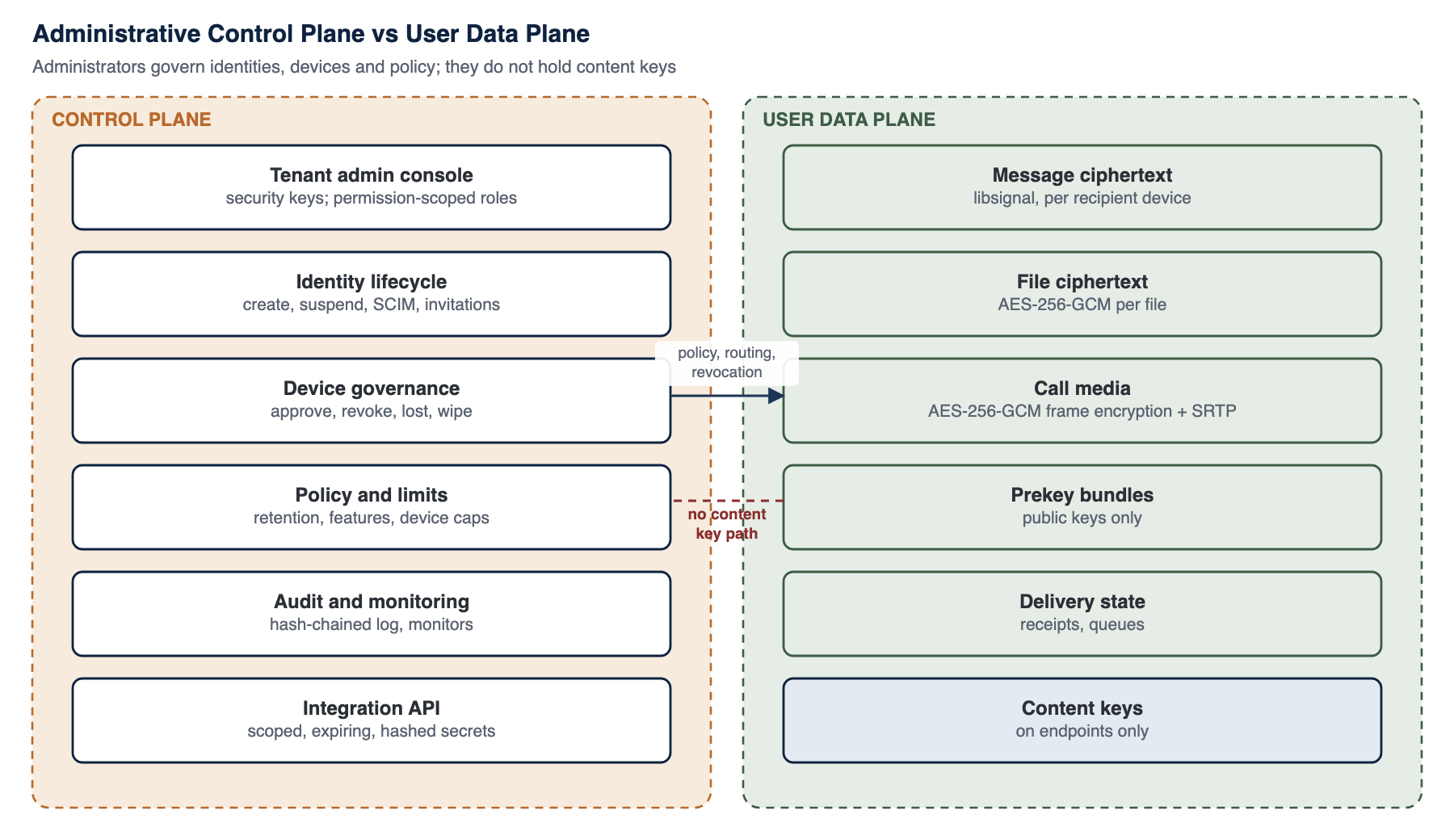
Figure 3: Administrative control plane versus user data plane
Administrators govern who exists, which devices are trusted, what features are enabled and how long data is kept. None of those actions gives an administrator a content key. The data plane carries ciphertext between endpoints, and the keys for that ciphertext are generated and held only on the endpoints. The separation matters most when an administrator account is compromised: the attacker gains the ability to change policy, revoke devices or read metadata, which is serious and is audited, but not the ability to read past or future message content directly.
Note
Note - Device governance and content
Because the control plane decides which devices belong to an account, SANKET does not let it add a device silently. Each account's device list is signed by the account's own devices and kept in an append-only log, and senders verify that signed list before they encrypt, so a device the server or an administrator inserts receives no copy of any message, call key or broadcast. Device caps, optional administrator approval, identity pinning on first contact, device inventories visible to users, safety-number comparison and audit events complete the picture (Chapter 14).
Footnotes
Evaluating SANKET for your organisation?
Talk to Tosh Defence about a technical briefing, a deployment plan for your infrastructure, or the controlled edition of this whitepaper under a non-disclosure agreement.