
Chapter 14
Device Trust Model
SANKET Technical Security & Architecture Whitepaper. Public edition 2.0, 7 October 2026.
In SANKET a device is a security principal in its own right. Access requires the conjunction of four things.
User identity + Authorised device + Cryptographic device identity + Policy = Access
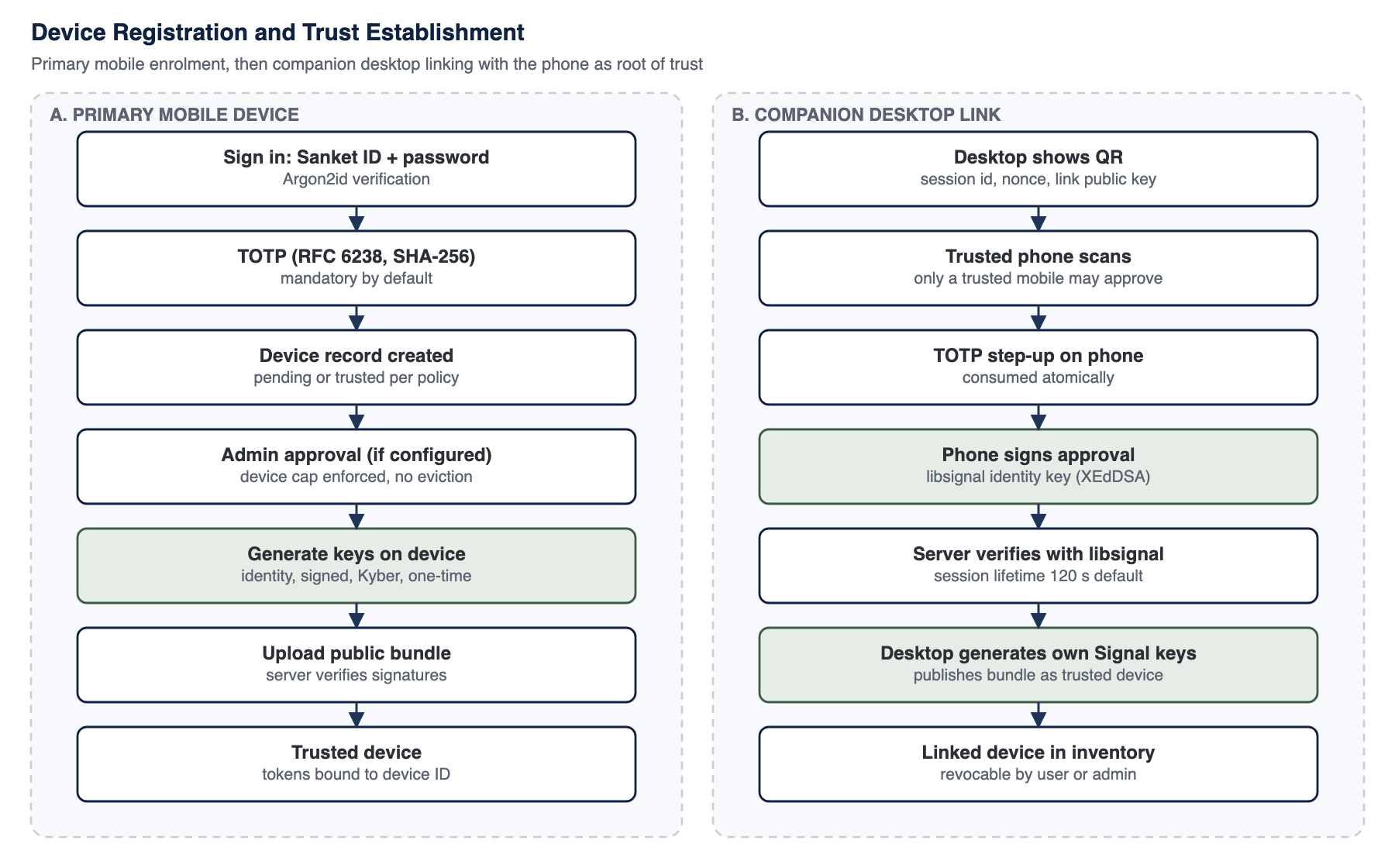
Figure 7: Device registration and trust establishment
14.1 Device States
Table 25: Device trust states
| State | Meaning | What the device can do |
|---|---|---|
| pending | Registered but not yet approved (administrator approval mode, or user at the device cap) | Nothing: no tokens and no client certificate are issued; administrators are notified |
| trusted | Approved device with a published libsignal bundle and an entry in the account's signed device list | Full use; included in message fan-outs; obtains its client certificate and re-mints it before expiry |
| lost | Marked lost by the user from another device or by an administrator | Locked out of the service and excluded from new messages until marked found |
| revoked | Removed from the account | Cannot refresh or authenticate; excluded from fan-outs; its client certificate is deleted and refused by the edge; wipe executes if requested |
14.1.1 Client certificate lifecycle
Every approved device holds a client certificate for mutual TLS (Chapters 10 and 16). The device generates the ECDSA P-256 key and the certificate signing request itself, on phones inside the hardware-backed store; the first certificate is minted only after the device has been approved. The device re-mints the certificate before it expires, and a revoked device cannot re-mint. Revocation, lost mode and a wipe delete the certificate and its key on the device, and the edge refuses a revoked certificate through its revocation list. Mobile and desktop follow the same lifecycle; on desktop the key is held by the Electron main process and the renderer never sees it.
14.2 Registration
- Approval mode is a tenant policy: automatic (a new device is trusted while the user is below the trusted-device cap) or administrator approval (recommended for high-trust deployments).
- Per-platform caps are enforced by refusing the new device; SANKET never silently evicts an existing device to make room.
- Ownership: a device record cannot be taken over by another account, and a banned handset remains banned across reinstallation.
- Keys: a trusted device generates its libsignal identity and prekeys locally and publishes only public keys, which the server verifies with libsignal.
- Signed entry: a new device is added to the account's signed device list by the approving device; a device the server records without a valid signed entry receives nothing.
14.3 Companion Desktop Linking
A desktop client cannot sign in with a password. It becomes a device of the account only when a trusted phone approves it. The desktop displays a QR code containing a session identifier, a nonce and its link public key; the phone scans it, the user completes a TOTP step-up (consumed atomically), and the phone signs a digest of the version, session, nonce, companion key and client metadata with its libsignal identity key (XEdDSA). The server verifies that signature with libsignal before accepting the link. The approving phone also adds a signed entry for the desktop to the account's device list; a link approval without a valid list signature leaves the desktop off the list, so other users' devices never encrypt to it. The link session is short-lived and the number of companion devices is capped. The same flow applies on mobile and desktop.
14.4 Device Inventory and Remote Actions
Table 26: Device governance actions
| Action | Who | Effect | Status |
|---|---|---|---|
| Approve | Administrator | Moves a pending device to trusted | IMPLEMENTED |
| Revoke | User (other device) or administrator | Ends authentication and future delivery; the device's client certificate is deleted and refused | IMPLEMENTED |
| Remote wipe | Administrator (licence and policy gated), per device or per user | Erases SANKET's data on a revoked device; completion is reported | IMPLEMENTED |
| Lost / found | User from another device, or administrator | Locks the device out until it is found; an automatic wipe can follow (configurable) | IMPLEMENTED |
| Locate | Administrator (enabled by the organisation) | Requests a single location fix from a lost phone, sealed end to end to a one-time key held in the requesting administrator's browser (HPKE with X25519, HKDF-SHA256, AES-256-GCM)1 and signed with the phone's identity key | IMPLEMENTED |
| Duress | User | Lets a user under coercion protect the account's data and alert administrators | IMPLEMENTED |
14.5 Anti-Theft and Reset
SANKET's anti-theft model combines the controls above: a lost device is locked out and stops receiving messages, can be located if the organisation has enabled Locate, and is then either marked found or remotely wiped. A wipe erases everything SANKET holds on the device, returning the app to its first-run state. A full factory reset of the handset itself is an operating-system function performed through the customer's MDM, and SANKET's managed-configuration support is designed to work alongside it.
14.6 Hardware-Backed Keys
On phones, the libsignal store, device secrets, the device certificate key and the account list key are encrypted with AES-256-GCM under a hardware-backed key: a Secure Enclave key on iOS, a StrongBox key on Android where the phone has one and a TEE key otherwise. They remain this-device-only and excluded from backups and device transfers (Chapter 11). Each phone reports its protection level, the server holds it per device, the administrator console shows it, and policy can require a minimum level. On desktop the same protocol runs with its secrets in the operating system's protected credential store (Chapter 11).
14.7 Posture and Integrity
Device posture, such as patch level and root or jailbreak state, is enforced through the customer's mobile device management, which is the authoritative source of posture on a managed fleet and avoids duplicating, and potentially contradicting, MDM compliance decisions inside the app. Alongside MDM compliance, SANKET detects common root and jailbreak indicators on the phone itself, using local checks only (no Google Play Integrity and no Apple App Attest, both foreign services). Detections are audited and alerted to administrators, and enforcement is configurable: when the organisation or its MDM requires it, a flagged device cannot use the app and the server refuses that device's requests as well, so a tampered app gains nothing. Local heuristics can be defeated on a device the attacker fully controls; they raise the bar and give administrators a signal, and MDM remains the authoritative source. SANKET supports vendor-neutral managed configuration on iOS (Managed App Configuration) and Android (managed configurations), which can only tighten policy: an MDM can require an app passcode, shorten the lock timeout, disable biometric unlock, tighten the wipe-after-failures policy and pin the expected tenant.
14.7.1 Android Key Attestation
On Android the phone proves where its keys live with Key Attestation:2 it answers a fresh server challenge with the attestation certificate chain of a hardware key, and the installation verifies the chain offline against the vendor root certificates shipped in the release, with a certificate revocation snapshot that is also shipped with each release, so verification makes no call to Google. A self-signed chain, a revoked intermediate or a replayed challenge is refused, and a client cannot raise its reported protection level without an attestation that verifies. Enforcement is configurable, as for root detection.
14.8 Forced and Recommended Updates
The administrator sets a minimum app version for iPhone and for Android separately (and one for the desktop client), and a signed licence may set a minimum that applies to every platform. A phone below its platform's minimum is blocked with an update screen whose button opens the tenant's own MDM or private-channel link, or the store listing; with no link configured it tells the user to contact their unit administrator. Between the minimum and a recommended version the app shows a dismissible "update recommended" banner. The phone re-checks the policy regularly, on return to the foreground and when the administrator changes the configuration. The server can also refuse outdated apps itself, per platform, with a dedicated "update required" answer that the apps show as the same update screen (configurable). Device revocation, lost-mode and wipe answers always take precedence over it.
14.9 Managed Devices and BYOD
Table 27: Managed devices compared with personally owned devices
| Consideration | Managed device (recommended for high-trust use) | Personally owned device (BYOD) |
|---|---|---|
| Operating system patching | Enforced by MDM | Depends on the user |
| Root / jailbreak posture | Enforced by MDM compliance, and blocked by SANKET when the MDM requires it | Detected and reported by SANKET; blocked when the organisation's policy requires it |
| Key protection | Hardware level reported and, on Android, attested; policy can require a minimum level | Same reporting and attestation; the level depends on the handset |
| App distribution | Enterprise or managed distribution | Public stores or side-loading |
| Policy tightening | SANKET managed configuration applies | Tenant policy only |
| Device loss | MDM wipe plus SANKET remote wipe and lost mode | SANKET remote wipe and lost mode |
| Residual risk | Lower; still subject to endpoint compromise | Higher; mixed personal use enlarges the attack surface |
14.10 Device-List Integrity
Senders learn a recipient's devices from the installation, but they no longer have to trust that list as served. Each account's device list is signed by its account list key, the installation keeps an append-only log of the signed lists, and every sender, mobile and desktop alike, verifies the signed list before it encrypts on any fan-out path (Chapter 13). A device that the server lists but the signed list does not receives no copy, and the user sees why. Identity keys are pinned, and device caps, administrator approval, user-visible device inventories, audit events and safety-number comparison continue to make any unexpected device visible to users and administrators.
When a contact's identity key changes, users are notified in every shared conversation. A device that was offline when the key changed receives the notice when it next connects: the server keeps the notice for each recipient device until that device acknowledges it, and a device can acknowledge only its own notices.
Footnotes
Evaluating SANKET for your organisation?
Talk to Tosh Defence about a technical briefing, a deployment plan for your infrastructure, or the controlled edition of this whitepaper under a non-disclosure agreement.