
Chapter 13
Identity and Authentication
SANKET Technical Security & Architecture Whitepaper. Public edition 2.0, 7 October 2026.
Every SANKET user is a customer-controlled identity, identified by a Sanket ID, and authenticated with a memorised secret and a second factor before any device-bound session is issued. Administrators are authenticated with a password and a FIDO2 security key.
13.1 Provisioning
Table 22: Ways an identity is created
| Method | How it works | Status |
|---|---|---|
| Administrator provisioning | An administrator with the user-creation permission creates the account, subject to the password policy and the licensed seat limit | IMPLEMENTED |
| Single-use invitation | The organisation issues an invitation code; codes are stored only as SHA-256 hashes and administrator-issued invitations are single-use. Default registration mode | IMPLEMENTED |
| Directory provisioning (SCIM 2.0) | The customer's identity system creates, updates, suspends and reactivates users through the SCIM 2.0 Users endpoint.12 A SCIM-created user activates with a one-time code shown once to the administrator and stored only as an HMAC. SCIM delete suspends rather than destroys | IMPLEMENTED |
| SAML, OIDC, LDAP / Active Directory sign-in | The customer's own identity provider can authenticate administrators to the console (OpenID Connect or SAML 2.0, as a first factor only) and can add a directory password check for end users at enrolment, device restore and new-device sign-in (LDAP). Federated sign-in never creates an account: a provider subject must already be mapped to an existing account (see Federated Sign-In below) | CONFIGURABLE |
| Bulk import | Large populations are provisioned through SCIM or the Integration API | IMPLEMENTED |
The registration mode is a tenant policy. A Sanket ID is permanent: when an account is deleted under the optional self-deletion policy, it is marked deleted, its devices are revoked and its Sanket ID stays reserved so that it can never be reassigned to someone else.
13.2 Sign-In
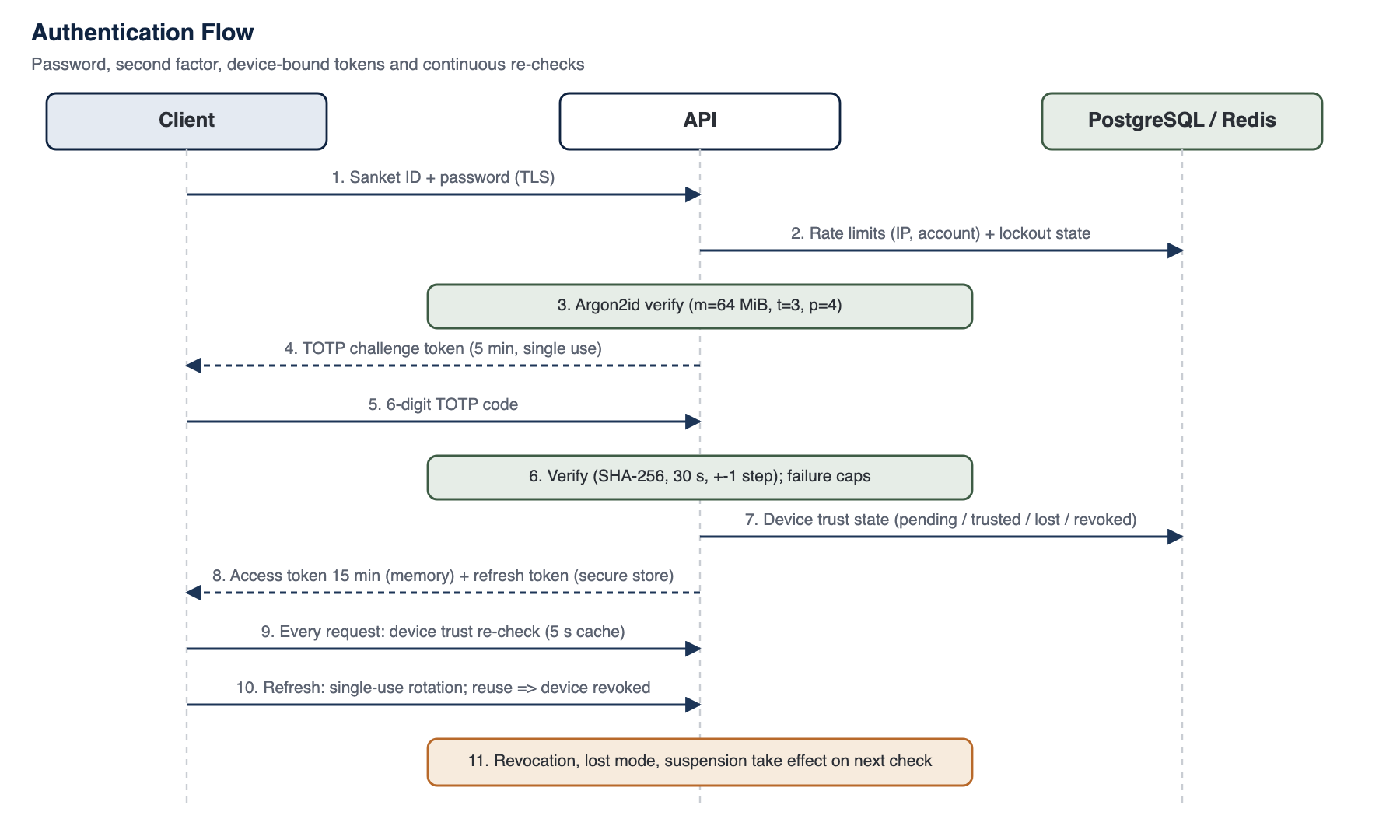
Figure 6: Authentication flow
13.2.1 First factor: password
Users sign in with Sanket ID and password. Passwords are verified against Argon2id hashes with 64 MiB of memory, three iterations and parallelism four, parameters within the range recommended by RFC 9106 and OWASP.34 The password policy enforces a configurable minimum length and character classes, and a new password may not repeat any of the account's recent passwords. Periodic password changes are configurable, in line with current NIST guidance, which discourages them in favour of strong passwords and a second factor;5 an organisation that requires them sets a maximum password age, and a sign-in with an older password then changes it before any session is issued, after every factor has been verified.
13.2.2 Second factor for end users: TOTP
The end-user second factor is a time-based one-time password (TOTP) following RFC 62386 with HMAC-SHA256, six digits and a 30-second step, accepting one step of clock drift either side. Each code is accepted once: after a code is used to sign in, step up, confirm enrolment or change a protected setting, the same code is refused for the rest of its validity, so a code observed over a shoulder or captured in transit cannot be replayed. SANKET never uses SHA-1 for TOTP, which means some popular authenticator apps that silently ignore the algorithm parameter cannot be used; SANKET displays the algorithm during enrolment and recommends compatible applications. TOTP is required for end users by default. After the password step the server issues a short-lived, single-use TOTP challenge token, with a limited number of failures allowed per token and per account.
13.2.3 Second factor for administrators: FIDO2 security keys
Important
Key Point - Phishing-resistant administrator sign-in
Administrators sign in with FIDO2 security keys (WebAuthn), verified by the installation itself with no external service.78 A security key is phishing-resistant: it signs only for the customer's own administrator origin.
After a valid password, an administrator with a registered key signs a fresh, single-use challenge with it. The installation verifies the assertion itself: the challenge, the exact administrator origin, the relying-party identifier (the customer's administrator origin), the user-presence and user-verification flags, the signature and the sign counter. Only ES256 and EdDSA credentials are accepted, attestation must be none or packed, and user verification (a PIN or biometric on the key) is required. Synced passkeys, recognisable by their backup-eligible flag, are refused by default, because they copy the private key into a vendor cloud. A sign counter that goes backwards is treated as a suspected clone, refused and audited. The verifier was reviewed against the W3C WebAuthn Level 2 specification; SANKET's policy is to use independently audited libraries, and any exception is reviewed and recorded, with detail in the controlled edition.
Use of security keys is set by tenant policy. Recovery from lost administrator keys follows audited procedures that alert the other owners; they are described in the controlled edition.
Registration, removal, revocation by an owner, failed assertions (with the reason), suspected clones, recovery actions and changes of the policy are audit events, exported through syslog and webhooks like every other event; they carry the administrator, the key label and the authenticator model, never the public key or the challenge. Phone passkeys are not offered, because the iOS and Android association checks they depend on are served by Apple and Google and cannot work in an air-gapped installation.
13.2.4 Phone and email verification
SMS and email one-time codes are used only to verify a phone number or email address during onboarding, never as a sign-in factor. SMS is off by default; supported providers include Indian aggregators as well as an international verification service, chosen by the customer. A deployment with no SMS provider simply does not collect phone numbers.
13.3 Federated Sign-In
An installation can use the customer's own identity provider. The provider's host must belong to the customer: public identity providers are refused when the configuration is saved. Provider secrets are held in OpenBao, never in the tenant configuration, and federated sign-in works only when it is enabled, licensed and configured.
Table 23: Federated sign-in
| Protocol | Who and when | Checks | Status |
|---|---|---|---|
| OpenID Connect | Administrators, at console sign-in, as the first factor | Authorisation code flow with PKCE (S256); single-use state and nonce; ID token signature verified against the provider's published keys with an algorithm allowlist that excludes none and HMAC; issuer, audience, authorised party, expiry, issue time and nonce checked |
CONFIGURABLE |
| SAML 2.0 | Administrators, at console sign-in, as the first factor | Service-provider-initiated only; signature checked against the pinned, configured provider certificate (never one carried in the message) and only the verified element read; InResponseTo single-use; Destination, Recipient, Audience and validity window checked; assertion replay cache; DTD and external entities disabled; RSA-SHA256 or stronger | CONFIGURABLE |
| LDAP / Active Directory | End users, at enrolment, device restore and new-device sign-in only | A bind as the mapped directory entry over LDAPS or StartTLS with the configured CA, under the installation's AES-256-GCM-only outbound TLS policy; a plain connection is refused; the client receives the same single failure answer as for a wrong password | CONFIGURABLE |
The identity provider is only ever a first factor. An administrator who signs in through OpenID Connect or SAML must still complete the local second factor, and the provider's own claims about how the user authenticated are not trusted in place of it. For end users the directory password is an additional check beside TOTP, device approval and the restore proof, never a replacement.
- Identity mapping. A provider subject is mapped to an administrator's internal identifier or to an end user's Sanket ID by an owner in the console or through SCIM. There is no just-in-time account creation: an unmapped subject is refused, and a provider username that equals a local name is never linked automatically.
- Roles. Administrator roles come from the console. If the owner enables a group-to-role map, it can never grant the owner role.
- Outage. A provider outage cannot lock the customer out of the console. For end users an outage affects only enrolment, restore and new-device sign-in.
- Libraries. Federated sign-in follows SANKET's audited-library policy; any exception is reviewed and recorded, with detail in the controlled edition.
13.4 Sessions and Tokens
Table 24: Session token design
| Element | Design |
|---|---|
| Format | JSON Web Tokens signed with HMAC-SHA256 (HS256) using separate access and refresh secrets of at least 32 characters; verification accepts only HS256, preventing algorithm-confusion attacks910 |
| Binding | Every token carries the device identifier; authorisation re-checks that device's trust state on every request. With device mutual TLS, the certificate fingerprint verified by the edge must also match the device record (Chapter 16) |
| Lifetimes | Short-lived access tokens for end users and administrators; refresh tokens with an operator-configurable maximum life |
| Refresh rotation | Single-use refresh tokens: the first use marks the token spent atomically. A short grace window tolerates lost responses on unreliable networks. Replay after the session has moved on revokes the device and raises a critical event11 |
| Re-checks at refresh | Account status, device trust, lost state and administrative blocks |
| Storage | Mobile: access token in memory, refresh token in platform secure storage. Administrator browser: access token in memory, refresh token in an HttpOnly, Secure, SameSite=Strict cookie scoped to the authentication path. Desktop: session held in main-process secure storage |
| Sign-out | Revokes the refresh token for its remaining life and revokes the device |
| WebSocket | Opened with a single-use ticket consumed atomically, then re-checked against device trust, revocation and suspension |
| Idle devices | Devices idle beyond a configurable period are revoked by the scheduler |
| Administrator session limits | Administrator sessions end after the configured idle period and absolute duration, enforced by the server on every request and refresh. The session start and the way the second factor was met are carried in the signed tokens; only sign-in and requests made while the administrator is using the console count as activity, so background refreshes never keep an unattended console signed in. The console shows when the session ends and signs out at the limit. End-user sessions are device-bound and not subject to these limits |
Effective session limits are the token lifetimes above and the automatic revocation of idle devices. On mobile, the application locks after a configurable time in the background when an app passcode or biometric lock is in use.
13.5 Brute-Force and Abuse Resistance
- Account lockout: after a configurable number of failures the account locks for a configurable period; administrators are alerted by email and SMS where configured. The thresholds are not disclosed to clients.
- Compound rate limits: sign-in attempts are limited per IP address and per account, with separate limits for activation, one-time codes and security-key assertions.
- Global limits: a shared request limit per verified user and device, or per IP address before authentication, and edge limits on authentication paths and on the API.
- Adaptive limits: limits tighten automatically when error rates rise.
- Block manager: administrators can block users, devices, IP addresses or network ranges, as hard denials or soft throttles.
13.6 Local Unlock
On mobile, an optional (or administrator-required) app passcode is verified locally against a PBKDF2-HMAC-SHA256 derivation with 600,000 iterations. Repeated failures lock the app for a time, and the organisation can set a number of failures after which the app erases its data; the desktop app applies the same protection. Biometric unlock uses the platform biometric API and can be disabled by policy or MDM; the key never leaves the device.
13.7 Device Restore and Recovery
A user who replaces a device can restore their account from the optional encrypted vault, opened on the new device with the vault password or recovery code, or from an exported backup file. Either one reproduces the user's identity key on the new device; a vault restore also returns the account list key (see Signed Device Lists).
The server then requires proof that the device holds the identity private key, not only the public key. It issues a fresh, short-lived challenge bound to the Sanket ID and to the device, usable once, and the device signs it with the identity private key. The server verifies the signature with libsignal before it reads or changes any account state. A request that carries only the identity public key, a signature by any other key, or a challenge that was already used or issued for another account or device is refused. An unknown account and a bad proof receive the same generic error, so the restore path does not reveal which Sanket IDs exist. Where the installation uses a directory, the user's directory password is also checked. Restore attempts are rate-limited and recorded in the audit log, so administrators can review every recovery.
The account's TOTP enrolment is kept only when the server itself confirms that the vault was opened: a successful vault opening returns a single-use vault-restore ticket bound to the Sanket ID and the device, and the restore request must present it. Any other restore, including one from an exported backup file or a vault restore without a valid ticket, resets TOTP and the user sets it up again, so a person holding only an exported file cannot keep an unverified second factor.
13.8 Signed Device Lists
Senders need to know which devices belong to an account. Each account therefore has an account list key: a separate libsignal key pair, generated on the account's primary device, which signs through libsignal only. The primary device signs the account's device list, a canonical structure with a version number, the hash of the previous list, a timestamp and one entry per device (its libsignal identity key and whether it is a mobile or desktop device), plus removals. Every new device and every desktop link approval adds a signed entry produced by the approving device.
- Append-only log. The installation keeps an append-only log of each account's signed lists and refuses a list that does not extend the previous one (a lower version, a broken previous-hash link, a bad signature or another account's list). Clients check that the lists they see only ever extend each other and never fork.
- Sender-side verification. Before encrypting on any fan-out path (one-to-one and group messages, identity rotation, call frame keys and the group-call key wrap, locate, encrypted broadcasts and the file keys inside messages), mobile and desktop senders verify the recipient's signed list. A device the server lists but the signed list does not gets no copy, and the user is told why.
- Lost primary device. The list key is sealed into the user's encrypted vault backup on the device and restored only after the device-restore proof above. Without it, the account is recovered only through an audited procedure in which every peer sees an identity-change style warning, so it cannot happen silently.
- Self-hosted. The log runs on the installation. SANKET does not use Signal's key transparency service or any external log.
Signed lists mean that a server that adds a device to an account cannot get messages encrypted to it. Safety-number comparison is the way to verify a contact's identity out of band (Chapter 10).
13.9 Identity Boundaries
- End users sign in on their phones with password and TOTP, with device binding and, optionally, device certificates; security keys are an administrator factor.
- The customer's identity provider never replaces the local second factor and never creates accounts.
- User X.509 certificates are not used; devices hold client certificates for mutual TLS (Chapter 26), and messaging identity remains libsignal identity keys.
Footnotes
-
P. Hunt et al., "System for Cross-domain Identity Management: Core Schema", IETF RFC 7643, September 2015. ↩
-
P. Hunt et al., "System for Cross-domain Identity Management: Protocol", IETF RFC 7644, September 2015. ↩
-
A. Biryukov, D. Dinu, D. Khovratovich, S. Josefsson, "Argon2 Memory-Hard Function for Password Hashing and Proof-of-Work Applications", IETF RFC 9106, September 2021. ↩
-
OWASP Foundation, "Password Storage Cheat Sheet", cheatsheetseries.owasp.org. ↩
-
P. Grassi et al., "Digital Identity Guidelines: Authentication and Lifecycle Management", NIST SP 800-63B. ↩
-
D. M'Raihi et al., "TOTP: Time-Based One-Time Password Algorithm", IETF RFC 6238, May 2011. ↩
-
W3C, "Web Authentication: An API for accessing Public Key Credentials, Level 2", W3C Recommendation, April 2021. ↩
-
FIDO Alliance, "Client to Authenticator Protocol (CTAP) 2.1", fidoalliance.org. ↩
-
M. Jones, J. Bradley, N. Sakimura, "JSON Web Token (JWT)", IETF RFC 7519, May 2015. ↩
-
Y. Sheffer, D. Hardt, M. Jones, "JSON Web Token Best Current Practices", IETF RFC 8725, February 2020. ↩
-
T. Lodderstedt et al., "Best Current Practice for OAuth 2.0 Security" (refresh token rotation), IETF RFC 9700, January 2025. ↩
Evaluating SANKET for your organisation?
Talk to Tosh Defence about a technical briefing, a deployment plan for your infrastructure, or the controlled edition of this whitepaper under a non-disclosure agreement.